Follow this guide if you already have a running Zigbee Home Assistant (ZHA) network and want to migrate to Home Assistant Connect ZBT-2.
Prerequisites
- Home Assistant 2025.11 or newer.
- A running Zigbee Home Assistant (ZHA) network with a Zigbee adapter.
- A Home Assistant Connect ZBT-2.
- A free USB port for your new adapter. If you don't have a free port, you can use a USB hub.
To migrate an existing ZHA network to Connect ZBT-2
Step 1
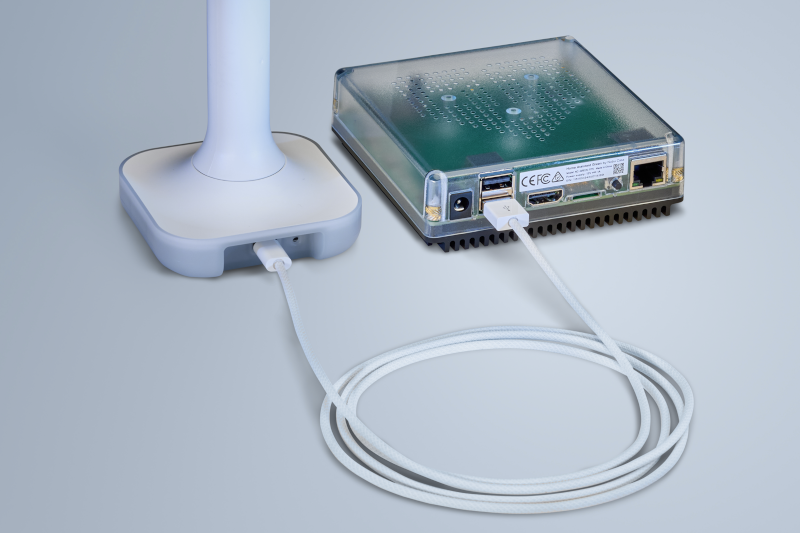
Plugging the extension cable into Home Assistant Connect ZBT-2
Notice
USB 3.0 ports and USB 3.0 drives can cause interference with 2.4 GHz protocols, including the ones provided by Home Assistant Connect ZBT-2.
- It is important to use the USB extension cable and to position the Home Assistant Connect ZBT-2 away from possible interference sources.
- This video shows the effect of interference.
- Plug the Home Assistant Connect ZBT-2 into the USB extension cable.
- Plug the extension cable into your Home Assistant instance.
- If you are using the standalone Home Assistant Container installation method, make sure Connect ZBT-2 is mapped to the container.
Step 2
Adding the Home Assistant Connect ZBT-2 integration

- Go to Settings > Devices & services.
- Home Assistant Connect ZBT-2 should now be discovered.
- Select Add.
Step 3
Picking your protocol
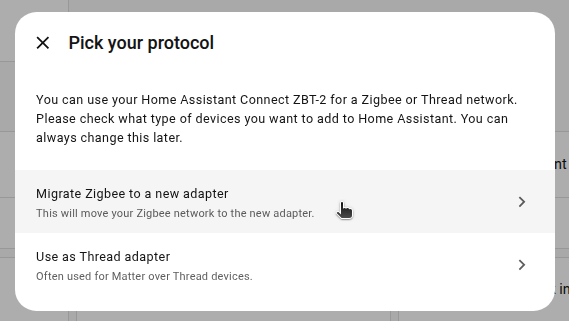
- In the dialog, select Migrate Zigbee to a new adapter.
- This will move the Zigbee network to your new adapter.
Step 4
Select installation type
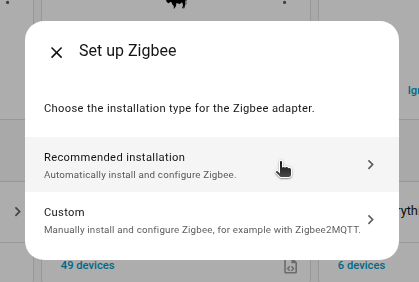
- Option 1: If you just want to migrate, select Recommended installation.
- This adds the device to Home Assistant, backs up your old adapter and moves those network settings to Home Assistant Connect ZBT-2.
- Option 2: If you run a different Zigbee solution, for example Zigbee2MQTT, select Custom.
- This adds the device to Home Assistant, but you will need to manually configure the software of your choice on your own.
- Those custom steps are not covered in this documentation.
Step 5
Migration complete!
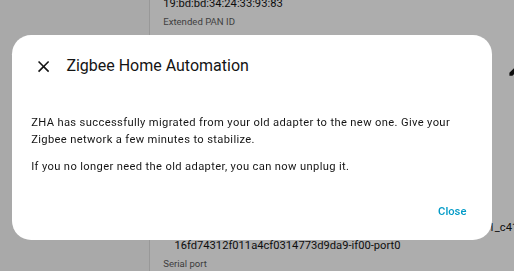
- The migration process is now complete.
- Info You won't be able to control the devices until they rejoin the network.
- Normally, they rejoin within one hour.
- You may be able to accelerate that process by power-cycling devices.
- You can now remove the old Zigbee adapter.